On this page (6)
Yuma AI isn’t a household name like Gorgias, Zendesk or Intercom. It doesn’t need to be. More than 140 ecommerce brands already let it run their inbox!
But is it what you need?
That’s the only question that matters. Not the demo. Not the case study PDF.
So here’s the honest tour: what Yuma AI is, who it’s for, what it really costs and which features earn their keep. By the end, you’ll know if it fits your store or if you’re about to buy a very smart layer for a problem it doesn’t fully solve.
Ready? Let’s go.
What is Yuma AI?
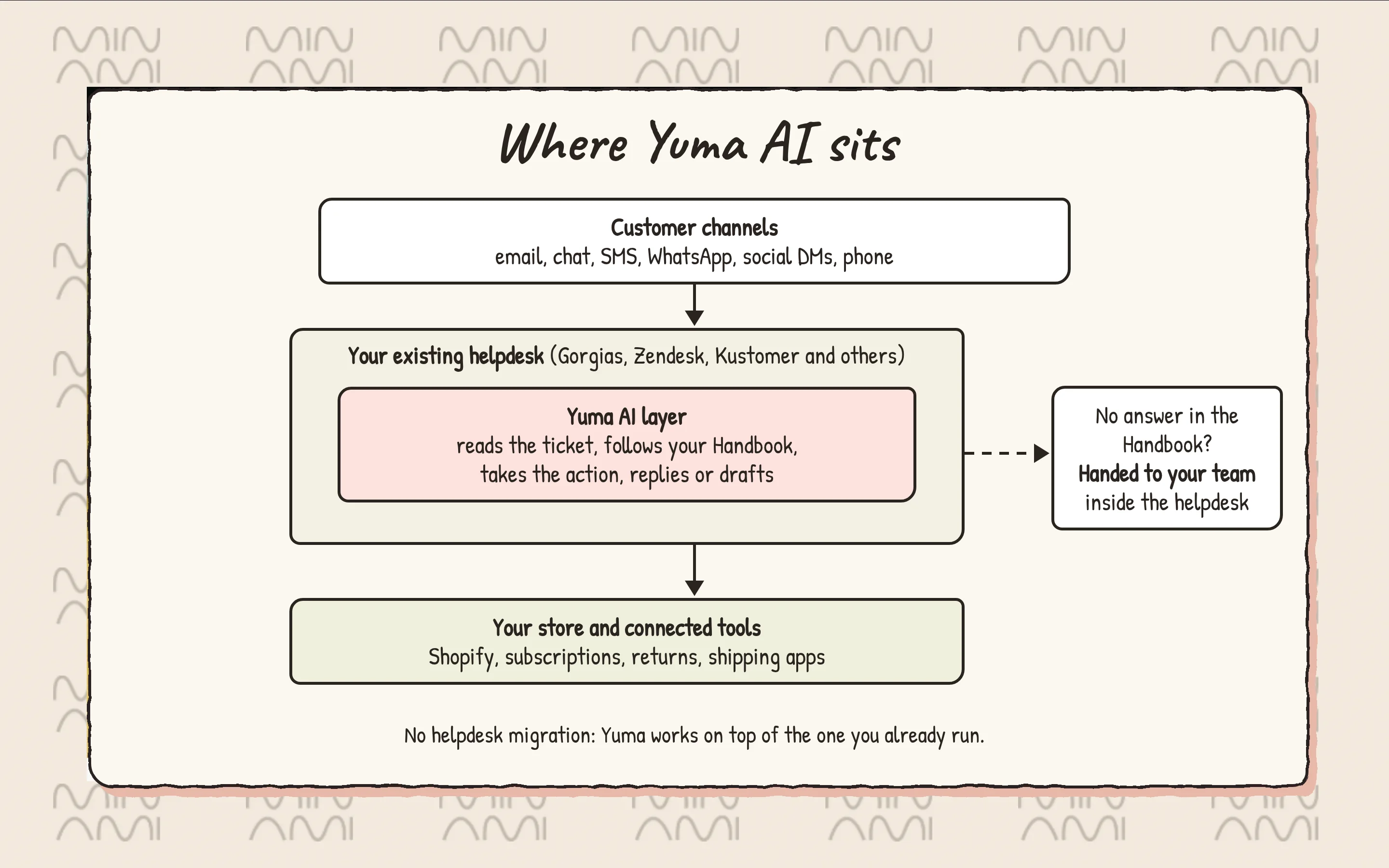
Yuma AI is an AI customer service platform built only for ecommerce. It plugs into the helpdesk you already pay for and closes tickets by taking actions in your store. Three jobs, basically:
- Resolve the repetitive stuff (order status, returns, refunds, order edits, subscription changes) with no human in the loop
- Keep every answer on policy and on brand through one plain-language Handbook
- Cover more channels with the same brain: email, chat, SMS, WhatsApp, social DMs, comments and phone
The company was founded in 2023, is backed by Y Combinator, and runs out of Boston with a European office in Barcelona.
Here’s the key thing to get: Yuma doesn’t replace your helpdesk. It moves in on top of it. If you run Gorgias or Zendesk, there’s no migration and no team retrain. That’s a big part of the appeal, and, as you’ll see, a big part of the ceiling.
Who should use Yuma AI?
Yuma is clearly made for ecommerce. Every page of the product screams Shopify. But “made for ecommerce” doesn’t mean “made for every ecommerce brand.”
Yuma makes the most sense when:
- You already run Gorgias, Zendesk, Kustomer, Salesforce Service Cloud, Gladly or Front, and the idea of migrating makes you tired.
- You have the volume. One G2 reviewer said it straight: the pricing needs significant ticket volume, or strong growth, before it pays off.
- Most of your inbox is WISMO, returns, refunds and subscription changes, and you want those gone. (Comparing more options? Here are the best AI agents for Shopify.)
- You like having a hands-on account team set things up and write your first playbooks with you.
And it makes less sense when you’re a small store doing a few hundred tickets a month, or when your real pain isn’t the ticket but the parcel stuck at a depot. More on that in a minute.
Yuma AI pricing
Good news first: Yuma now publishes its prices. Plenty of AI vendors still hide behind “Book a demo.”
The model is outcome-based. You pay only for tickets Yuma fully resolves, start to finish, with no human touching them. Escalations and conversations cost nothing.
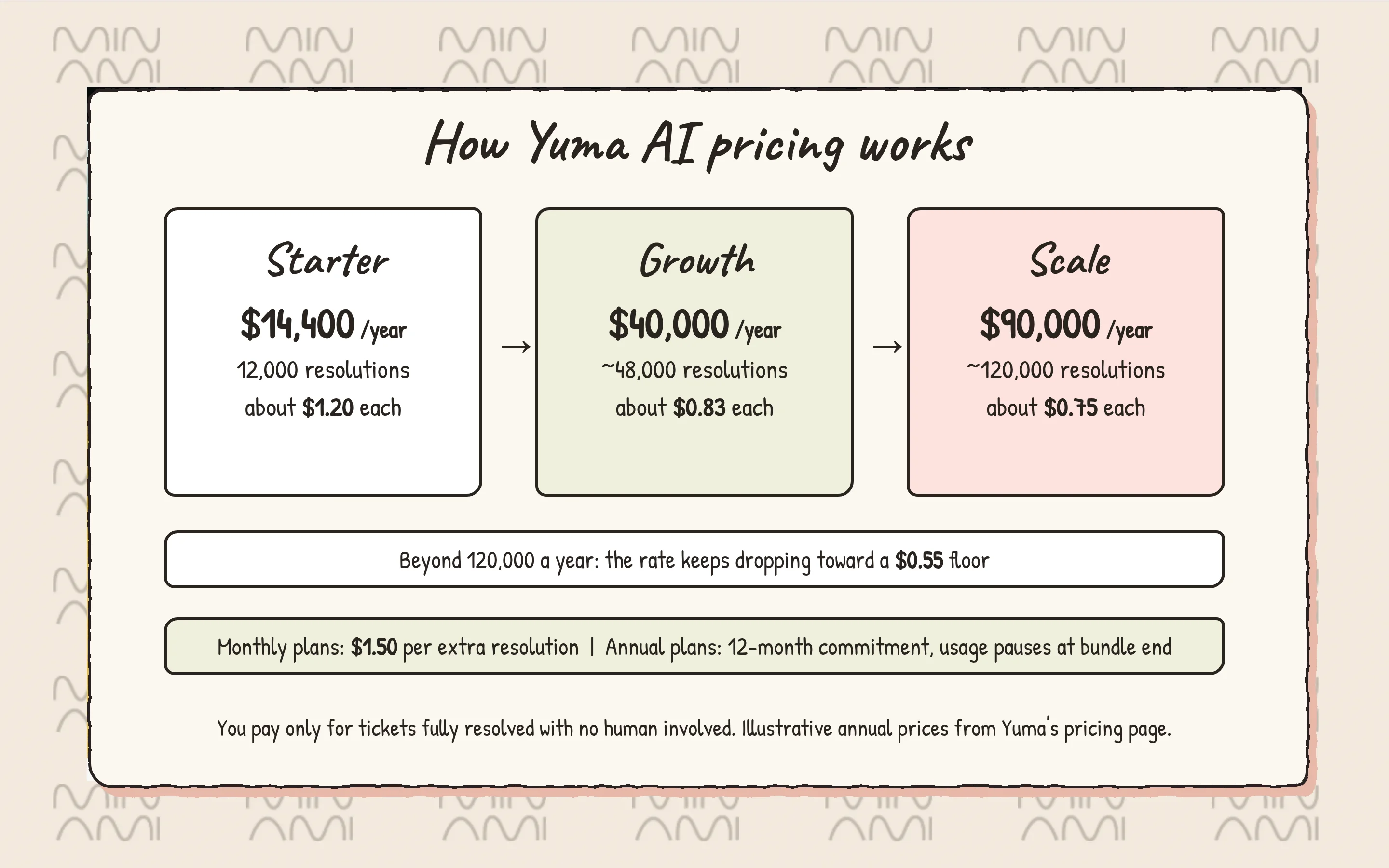
The pricing page shows three plans, as illustrative annual prices paid upfront:
- Starter: $14,400 a year, about $1.20 per resolution, for 12,000 resolutions.
- Growth: $40,000 a year, about $0.83 per resolution, for roughly 48,000 resolutions.
- Scale: $90,000 a year, about $0.75 per resolution, for roughly 120,000 resolutions.
Now the fine print, because that’s where the bill lives:
- Every plan comes with a 12-month commitment. Monthly plans exist too.
- On annual plans, automation pauses when your bundle runs out. No overage, but also no AI until renewal.
- On monthly plans, each extra resolution costs $1.50.
- Above 120,000 resolutions a year, the rate keeps sliding toward a $0.55 floor.
- No implementation fee, and the first 30 days are free.
- Sales AI, Social AI, Voice AI and custom integrations are add-ons, priced on a call.
The Shopify App Store tells a slightly different story: a Small Merchant plan at $850 a month and a Medium Merchant plan at $1,200 a month, each with a package of automated tickets, overage fees and a 14-day free trial.
Want to run the numbers for your own volume? Here’s how Yuma AI pricing works in detail, with a simple way to test the ROI.
Price checked. Now let’s see what you get for it.
Yuma AI features
Here are the Yuma AI features that actually matter, minus the marketing gloss:
1. Handbook
The Handbook is the heart of Yuma 2.0, and honestly, it’s a smart idea. One plain-language document runs every conversation. You upload the SOPs you already have, and Yuma turns them into pages.
What you get:
- Brand pages that set how Yuma sounds: tone, length, structure, and the things it must never say.
- Playbooks for what to do in each situation, and Procedures for the exact steps.
- Ask Yuma, which changes a policy from one sentence and shows every page it touches as a draft. It also works inside Claude and ChatGPT through MCP.
- Tests on every playbook, replayed as simulated conversations before you publish.
- When the Handbook has no answer, Yuma hands the ticket to a person and logs the gap as a question you answer once. No improvising. Good.
2. Support AI
This is the main product. It reads the ticket, checks the Handbook, takes the action and replies in your voice, all inside your helpdesk.
What you get:
- 100+ pre-built actions for refunds, order edits, cancellations, discount codes, subscription changes and CRM notes.
- Package Tracker, which pulls real-time carrier data into WISMO tickets.
- Media Brain, which reads photos, videos and PDFs for damage claims, SKU matching and receipts.
- Invoice Maker, which builds branded PDF invoices from Shopify order data.
- Web Actions, which drive a real Chrome browser to finish work in tools with no API, like filing carrier claims, taught once from a screen recording.
- Outbound playbooks that start conversations by email or SMS when an order is placed, a parcel lands or a checkout is abandoned.
Note: in Gorgias, Yuma works in auto-reply or draft mode next to your macros, tags and routing rules. In Zendesk, it runs as a native app on top of your setup. Either way, the helpdesk stays the center of gravity, and if that helpdesk is Gorgias, its own AI is worth a look too: here’s Gorgias AI Agent pricing.
3. Guardrails and rollout
This is where Yuma clearly did its homework. Merchant reviews keep coming back to accuracy, and this is why.
What you get:
- Gradual Rollout, which puts a new playbook live on 10% of matching conversations while your team reviews the rest as drafts.
- Hard Limits that cap refund amounts, coupon values and loyalty points.
- Fraud Shield, which flags risky orders before they turn into chargebacks.
- 15 to 20 quality checks on every drafted reply, across multiple AI models, with failover between OpenAI, Anthropic and Google.
4. Chat AI and Voice AI
Yuma also has its own chat widget and a phone agent. Both run on the same Handbook as email, so your answers don’t drift by channel.
What you get:
- Chat AI installs with a short snippet and can issue refunds, replacements, address changes and return labels right in the chat. When it needs a human, it hands off to your helpdesk with the full thread.
- Signed-in shoppers can be recognized with a signed token, so nobody gets asked for their order number for the fifth time.
- Voice AI answers calls 24/7, confirms changes out loud and makes them in Shopify or your subscription tool before the call ends. Yuma provisions US and UK numbers. In the EU, you bring your own.
- Voice AI is an add-on, not part of the base plans.
5. Sales AI and Social AI
Two separate products, sold as add-ons. Useful, but budget for them.
What you get:
- Sales AI, a storefront shopping agent that answers sizing, compatibility and shipping questions and recommends products. It runs on its own subscription.
- Social AI, which classifies Instagram and Facebook comments by intent and sentiment, then replies, likes, hides, moves to DM, escalates or skips based on your rules.
6. Reports
Yuma gives you a CX dashboard with automation rate, escalations, intent breakdowns and response times. The deeper stuff depends on your plan.
- Core reporting: CX dashboard, Insights Advisor weekly trends, CSAT Pulse surveys and Automation Health tracking.
- Listed from the Growth plan up: advanced analytics, Deep Search across ticket history and quarterly business reviews.
7. Other features
- 180+ languages, detected automatically per customer.
- Multi-brand and multi-store routing from one Handbook.
- A long integration list (Yuma’s own pages quote 50+, 60+ and 100+) across helpdesks (Gorgias, Zendesk, Kustomer, Front, Gladly, Re:amaze), stores (Shopify, BigCommerce, WooCommerce, Magento), subscriptions (Recharge, Skio), returns (Loop, AfterShip Returns) and shipping (ShipStation, ShipBob).
- A published carrier list of five: DHL, USPS, Chronopost, Mondial Relay and Colis Privé.
- SOC 2 Type II, GDPR and CCPA compliant.
- Slack support on every plan, plus a dedicated account team for onboarding.
The verdict from users is strong: 4.8 out of 5 on G2 from 24 reviews, with an average implementation time of one month. If you’re still shopping around, our list of Yuma AI alternatives puts it side by side with the rest.
Why choose Minami AI over Yuma AI?
Yuma is good at closing tickets. Minami is built to close the problem behind them.
Why?
Yuma lives inside your helpdesk and escalates there, its outbound messages go by email and SMS, its published carrier list names five carriers, and carrier claims in tools without an API run through a browser it drives. Minami doesn’t wait for the ticket: it goes to the carrier, fixes the problem and writes the result back into your store.
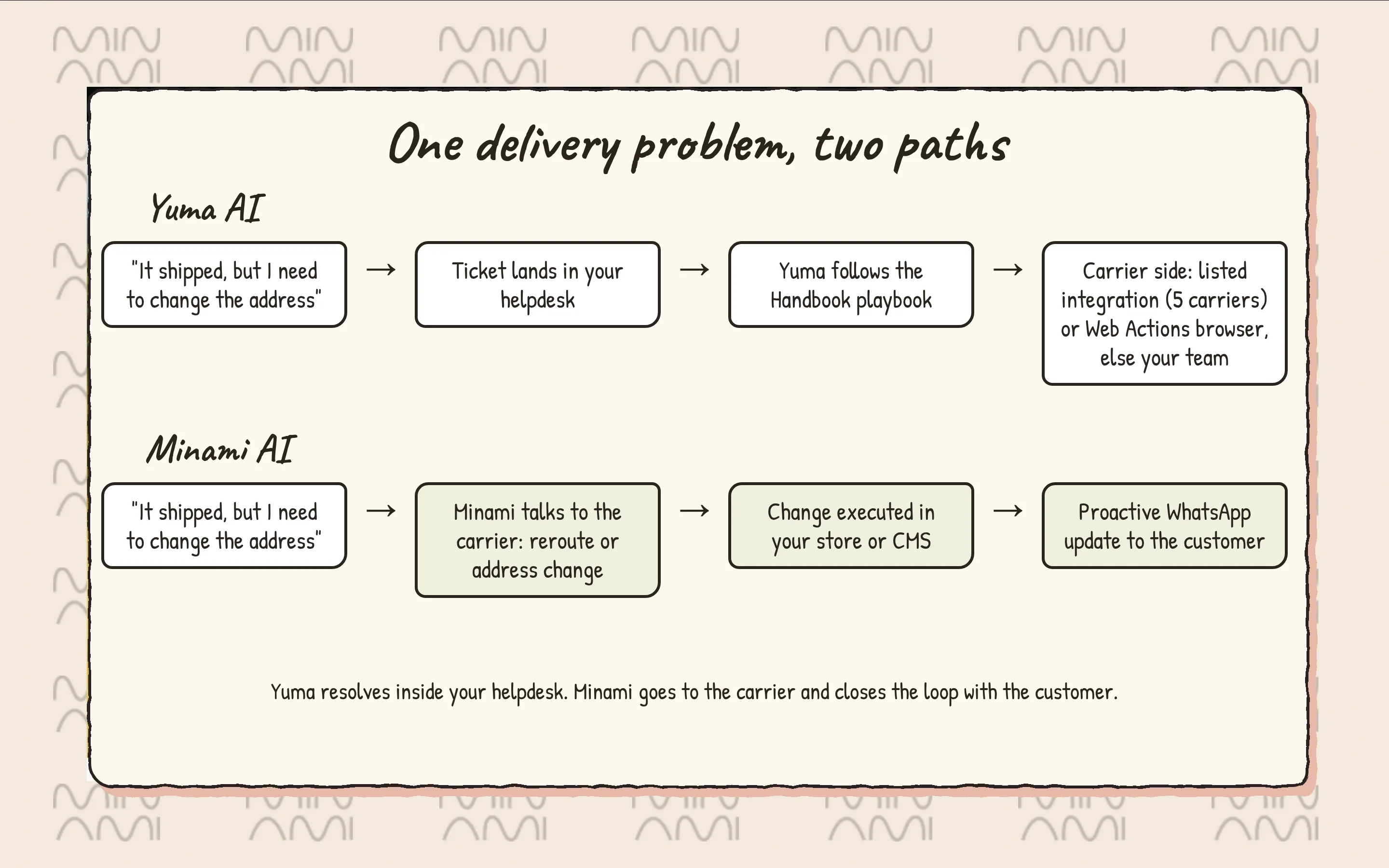
Here’s what makes Minami better than Yuma:
- Carrier problems solved at the source: Minami talks directly with carriers to change delivery addresses, reroute parcels and open delivery incidents, then executes the change in your store or CMS end to end. Nobody pastes a tracking number into a portal.
- Orders and returns that actually change: it edits and cancels orders, corrects addresses, and turns a return into an exchange with a product recommendation in the same conversation. See how it handles returns and exchanges.
- Customers who hear from you first: Minami sends proactive WhatsApp messages to end customers, so a delay or an address issue reaches them before they write in. More on that in our guide to the best AI WhatsApp chatbot for ecommerce.
Minami pricing is custom, built around your store. You don’t need a helpdesk in the middle for it to work, and every job ends with the order, the parcel or the exchange actually changed. If you want the bigger picture of tools that sit next to your inbox, our ecommerce help desk software guide covers them.
Pretty different, right?
Ready to switch to Minami AI?
Per-resolution pricing sounds simple until you have to forecast it. Bundles, 12-month commitments, overages and add-ons add up fast.
Minami keeps it boring, in the good way. One custom price for an agent that fixes the post-purchase problem end to end: with the carrier, in your store and on WhatsApp.
Ready to switch? Book a demo with Minami and watch it work on your own orders.
Whatever you pick, we wish you and your store a quiet inbox!
Minami AI agent
Automate 100% of your eCommerce support
Minami doesn't just chat. It takes the action inside your store and sells while it solves.
- Order edits and cancellations
- Address changes and delivery incidents
- Returns, exchanges and product recommendations