 Nobikage San
 Introducing
Zendesk Copilot isn’t what people think: Our review after testing the add-on
A clear breakdown of what Zendesk Copilot actually offers, how its AI works, and where it falls short for ecommerce teams
If you’re looking into Zendesk Copilot, just keep in mind it’s not your typical agent-assist tool like ChatGPT, Grok, or any other conversational AI solutions. It works a bit differently.
Instead, Zendesk AI Copilot is designed to support your agents while they work. But what does that actually mean? And is it worth bringing into your organization?
Let’s break down what Zendesk Copilot is, what features it offers, and when it makes sense to use it—or not.
What is Zendesk Copilot?
Zendesk AI Copilot is the internal assistant built into the Agent Workspace. It doesn’t handle conversations with customers. t works for your team. Its job is to speed up every step of the support workflow by handling small task
Think on it as a new extension of their platform, not as a idedepent AI Agent, because you shpuld use their core platform in order to enjoy Copilot feature. Is, basically, a part of Zendesk
It’s a paid add-on to your Zendesk Suite plan, which can make your budget feel a little tighter. And if you’re not fully convinced it’s the right fit, you can always look at other Zendesk alternatives before committing.
How does it work?
The whole idea behind Copilot is to predict what your agents need before they even ask for it. To do that, it uses its AI capabilities to run a quick triage the moment a ticket is created. It scans the message and suggests things like relevant macros, help center articles, or even a full first-draft reply.
Copilot also pinpoints the customer’s intent, detects the language, and identifies the sentiment. These labels appear automatically in the Zendesk interface, helping your team understand the ticket faster and cut down on manual work.
Remember that Zendesk Copilot is not an AI designed for ecommerce businesses. If that’s your case, Minami is your best alternative. Our tool is built to bring the workload and cost of your human support team down to zero. Book a demo with us.
Zendesk Copilot features explained
| Feature | What it does |
|---|---|
| Auto Assist | Reads the ticket, understands the request, and suggests the correct procedure for the agent to approve. Can handle flows like cancellations or refunds. |
| Suggested First Replies | Creates a full draft reply by pulling info from macros, help articles, and past conversations. Depends on the quality of your documentation. |
| Enhanced Writing Tools | Expands short notes into paragraphs, adjusts tone, simplifies text, and applies custom rewrite rules—all directly in the draft. |
| Suggested Macros | Matches the customer’s message with your macros and highlights the best options with confidence scores. |
| Ticket Summaries | Turns long conversations into quick, clear summaries that update automatically as new messages come in. |
| AI Translation for Articles | Generates multilingual help center articles inside the editor, keeping structure and meaning intact. |
| Voice Support Tools | Transcribes calls in real time and creates a clean summary afterward so agents can focus on the conversation. |
1. Auto assist
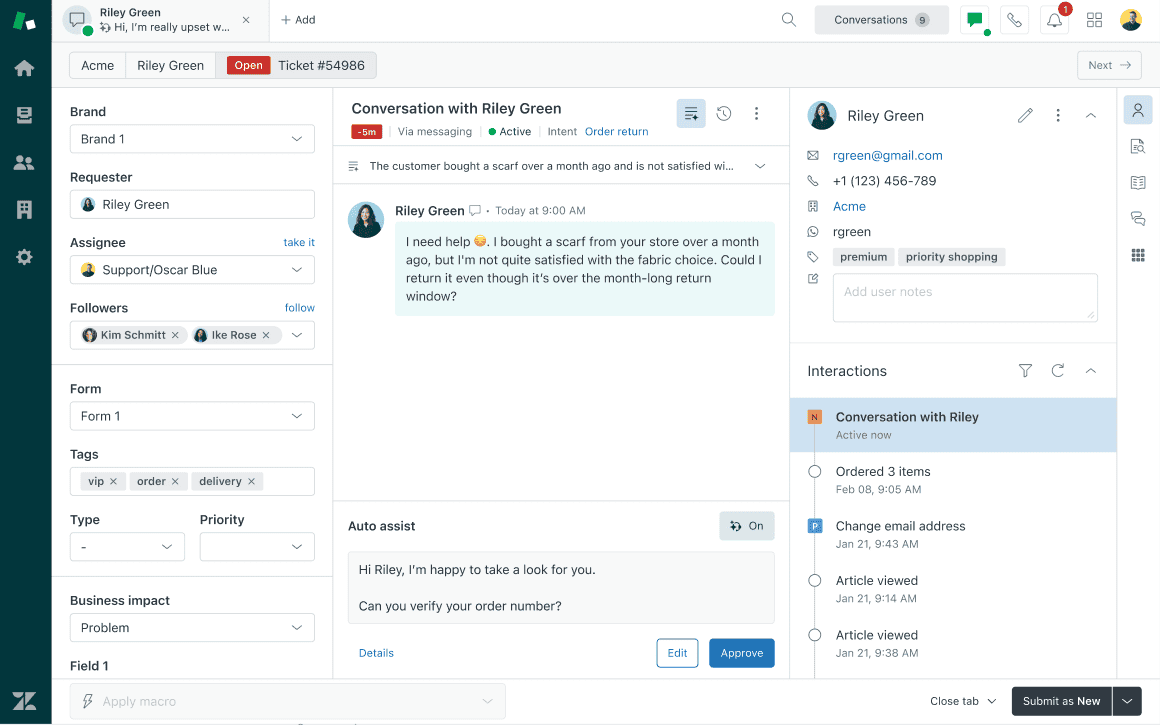
Auto Assist reads the ticket, understands what the customer is asking for, and suggests the right procedure for the agent to approve.
A cancellation flow, for example, might check eligibility, confirm the refund rules, process the refund through Shopify, and send the final confirmation.
3. Suggested first replies
Suggested first replies kick in the moment a ticket lands. Copilot reads the customer’s message, looks at your macros, help center articles, and past conversations, and then puts together a full draft based on what it finds.
Just keep in mind that Copilot relies heavily on the quality of your own documentation to decide what it should include.
4. Enhanced writing tools
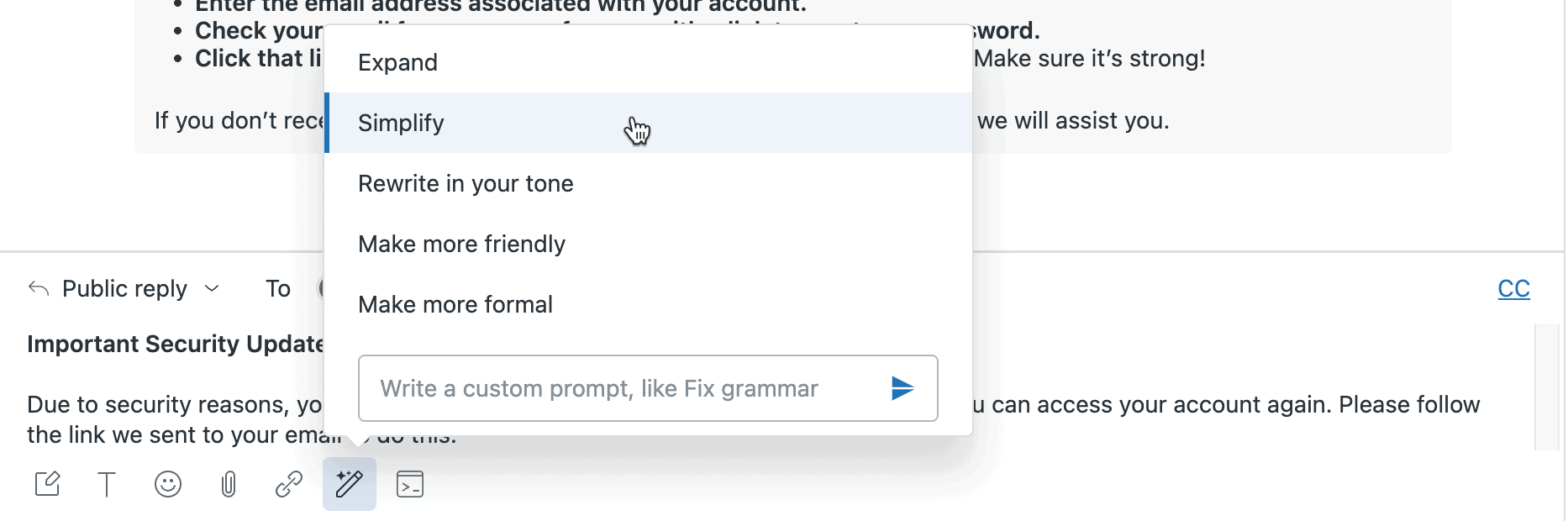
Copilot helps agents polish their messages on the fly. It can turn quick notes into full paragraphs, adjust the tone, simplify the wording, or follow custom instructions you set for your team.
Everything happens right in the draft, so agents can rewrite text with one click and keep the conversation moving.
Key actions Copilot can take:
-
Expand short notes into full paragraphs
-
Make the message friendlier or more formal
-
Simplify wording and remove jargon
-
Apply custom rewrite rules your team defines
5. Suggested macros
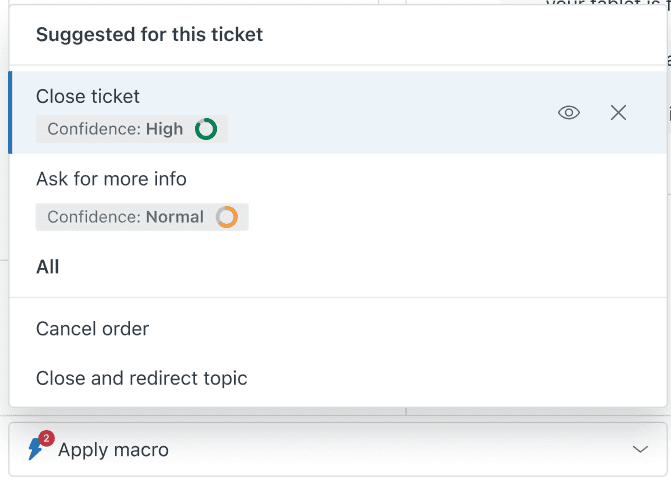
Zendesk Copilot compares the customer’s message with your existing macros and assigns a confidence score to each one. Agents then see the best-matching options at the top of the macro list, along with the confidence indicators that help them pick the right one faster.
6. Ticket summaries
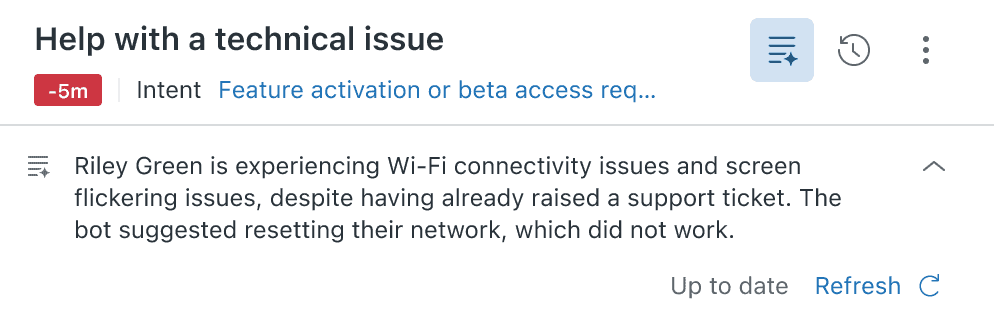
Copilot scans long conversation threads and turns them into a short, clear recap by pulling out the key points. The summary appears in the ticket sidebar and updates automatically as new messages come in.
Besides that, Zendesk Copilot offers the option to auto-merge two or several tickets from different channels into one when the AI detects that the intent is the same or very similar.
7. AI translation for articles
AI translation helps you publish help center articles in multiple languages without hiring translators or rewriting everything by hand. You can generate translations right inside the editor, and Copilot keeps the structure and meaning intact.
It’s an easy way to keep global documentation fresh—teams get clean, consistent versions for every market in just a few minutes.
8. Voice Support Tools
If your team spends time on phone calls, Copilot helps you there too. It can transcribe the call as you talk and then turn it into a clean summary once you are done. No more scrambling to type notes while trying to listen. You stay focused on the person on the line and Copilot handles the rest.
Implementation and setup requirements
To use Zendesk AI Copilot, you need the Copilot add-on.
It’s available on Suite and Support Professional plans or higher, and it adds $50 per agent per month on top of your existing plan.
After you buy it, most features must be switched on from the Admin Center. A few come active by default, like intelligent triage and quick answers. Others—auto assist or suggested replies—need a bit of setup before they’re useful.
Auto assist takes the most work. You pick the workflows where step-by-step guidance actually helps, enable the feature for the right agent groups, write the procedures, test them, and then follow the analytics to see what’s landing and what needs rewriting.
Estimated Zendesk Copilot monthly cost
Zendesk Copilot has pay to go mode. If you want to calculate the real cost of Zendesk Copilot, you need to add the price of the add-on to your core Help Desk subscription. Zendesk charges around $1.50 per automated ticket resolution using Copilot.
Their Help Desk subscriptions are:
-
Suite Team: $55 per agent/month
-
Suite Professional: $115 per agent/month
-
Suite Enterprise: $169 per agent/month
Here’s a clean table estimating the real monthly cost of Zendesk Copilot based on ticket:
| Plan | 100 tickets | 500 tickets | 1,000 tickets |
|---|---|---|---|
| Suite Team | ~$200 | ~$800 | ~$1,500 |
| Suite Professional | ~$260 | ~$860 | ~$1,600 |
| Suite Enterprise | ~$320 | ~$920 | ~$1,660 |
Limitations of Zendesk Copilot
-
Not a chatbot or agent replacement: Copilot doesn’t talk to customers or solve tickets on its own. It only supports your team in the background, so it won’t reduce ticket volume or automate post-purchase work.
-
Requires the full Zendesk ecosystem: You can only use Copilot if you’re already on Zendesk Suite, which costs between 69 and 219 dollars per agent each month. And because Copilot is an extra paid add-on, your total cost grows fast.
-
Not built for ecommerce or inventory-based brands: It can’t edit orders, fix delivery issues, process returns, or talk to carriers. If your business moves physical products, Copilot hits its limits right away.
-
No learning from your past tickets: Copilot ignores your real conversations, so it can’t use them to improve. Admins end up creating responses and workflows manually, which takes time and limits accuracy.
-
Very limited customization: You’re stuck with the actions Zendesk already provides. No custom APIs, no internal tools, no flexible logic. If your workflows aren’t simple, you’ll feel boxed in.
-
No safe testing environment: The trial doesn’t show how Copilot performs with real tickets. You can’t simulate results, so you’re forced to turn it on without knowing what to expect.
-
Costs add up quickly: Copilot is an additional paid feature on top of your Zendesk seats. For teams with several agents, the monthly bill gets heavy fast.
Minami, a better option than copilot for eCommerce
If you need more than internal AI assistance, Minami gives ecommerce teams something Copilot can’t: a fully autonomous agent that handles real post-purchase work. It fixes orders, manages returns, talks to carriers, and closes out issues without handing tasks back to your team.
For stores that want fewer tickets, lower support costs, and a smoother customer experience, Minami is simply a better fit.
Frequently Asked Questions
Have more questions? Fill this form and our team will be in touch to answer them!
-
Is Zendesk Copilot a chatbot?
- No. Copilot doesn’t talk to customers. It only helps your agents behind the scenes with drafts, summaries, and suggestions.
-
Can I test Zendesk Copilot safely before going live?
- Not in a meaningful way. The trial doesn’t simulate real tickets, so you can’t see how it actually performs.
-
How much does Zendesk Copilot really cost?
- In most cases, no. Good AI agents already know how to use order data, return policies, and shipping info. You may add FAQs or brand tone, but you don’t have to feed it huge training datasets.
Get Started
Minami is available with zero setup
No integrations. No workflows. No dev time. Just power up Minami and let your AI agent cut refunds, manual labor, and losses